How to choose project management software for an engineering firm
Most tools track hours and send invoices. The question is whether they show what a phase is earning while it is still open. Seven checks to run before you choose one.

Zeus Lopes
Forward Deployed Engineer, Excede
Zeus builds the Excede platform, delivers it with each firm, and audits the numbers until they match how the firm actually runs.
Project management software for an engineering firm has two jobs. The first is tracking hours against phases and turning them into invoices. Almost every tool does that. The second is showing, while a phase is still open, whether it is making money. That is the part most firms only learn at closeout, and it is the part to test before you buy.
I'm a Forward Deployed Engineer at Excede. I connect a firm's systems, then sit with its real data until every number means what the principals think it means. Most of what I know about choosing this kind of software comes from those first weeks, when the numbers either hold up or they don't.
These are the seven checks I would run on any tool, ours included.
1. The multiplier on every phase, while it is still open
A project report at closeout is a post mortem. By then the fee is spent, and the only decision left is what to do differently next time. The number that matters is the net multiplier of each phase while there is still time to change staffing or talk to the client about scope.
Ask the vendor to open a project that is halfway through and show you each phase on one screen: fee, hours logged, what has been invoiced, and the multiplier those add up to. If that takes a custom report, your project managers will not look at it.
How Excede handles it: every phase shows planned labor, logged labor, what has been invoiced, and the multiplier. Each phase also carries a status of on track, watch, or at risk.
2. Consultant fees and reimbursables stay out of the multiplier
When a firm bills a subconsultant's fee or a reimbursable expense on its own invoice, that money passes through. The firm did not earn it with its own labor. Leave it in, and the multiplier looks better than it is. In the net multiplier article, the same project reads 3.45 with those costs left in and 2.87 once they come out.
Ask the vendor whether consultant fees billed through you are inside the revenue behind the multiplier.
How Excede handles it: reimbursables and subconsultant fees come out of revenue before the multiplier is calculated. Whether contract labor counts as your own labor or as a consultant is a setting the firm chooses, and every number moves with it.
3. Percent complete that cannot flatter itself
On fixed fee work, earned value is the fee times percent complete. Hours alone say a phase is 80% done when the team has burned 80% of the budget, even if half the drawings are missing. That calls an overrun earned. A checklist alone says 80% when 80% of the boxes are ticked, even if the work behind them is thin.
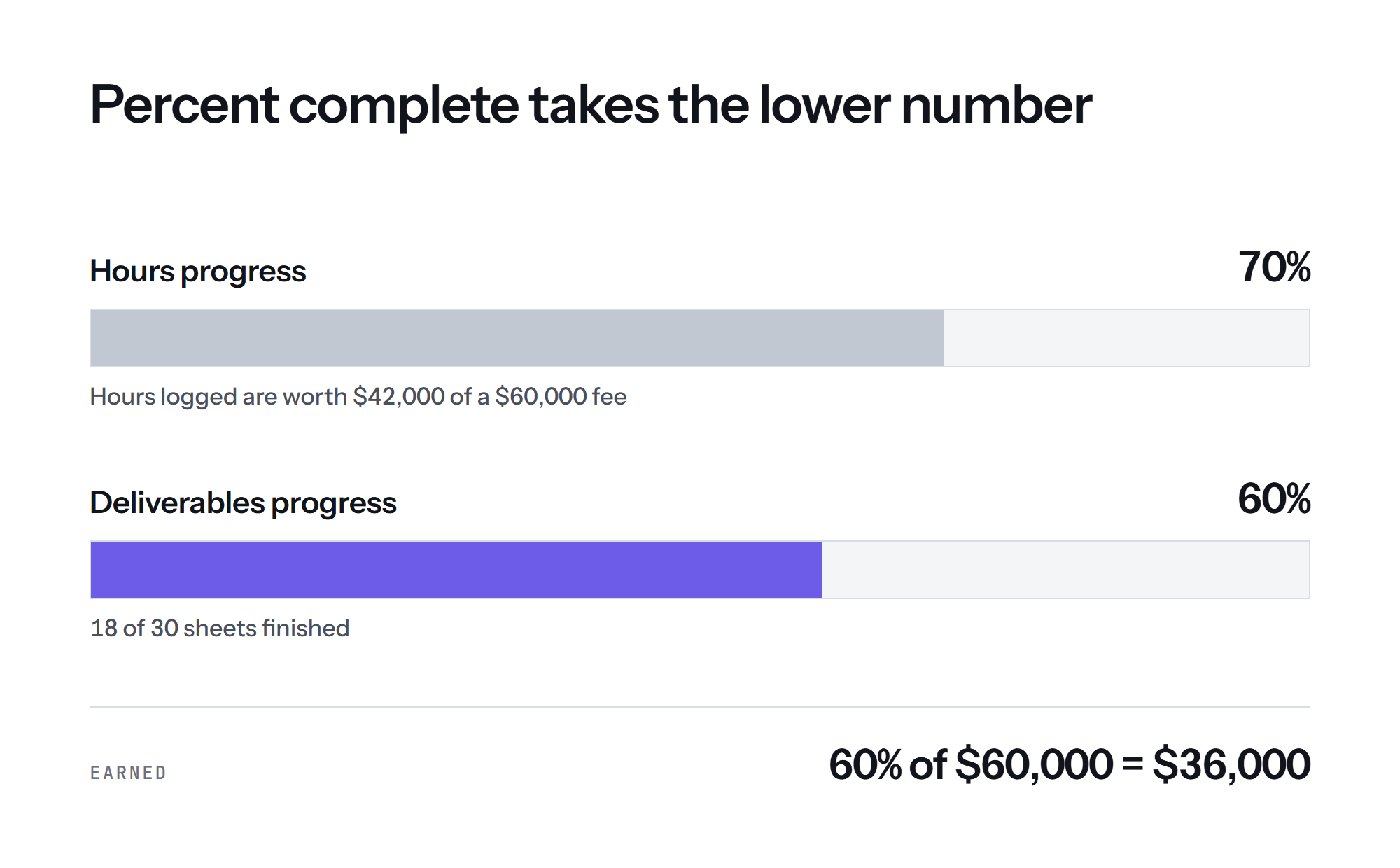
Ask the vendor how the software decides that a phase is 60% complete.
How Excede handles it: it looks at hours progress and deliverables progress and takes the lower of the two. When someone marks the phase done, it counts as 100%.
4. Hours stay in the month they were worked
Most reports count realization by the month the invoice went out. Say a team logs 120 hours in July, nobody invoices them until October, and 40 of them get written off. July shows nothing billed. October shows money with no hours behind it. The 40 hours never appear anywhere as a loss. I wrote up how to calculate realization rate by the month the work happened, because that one choice decides whether you ever see the loss.
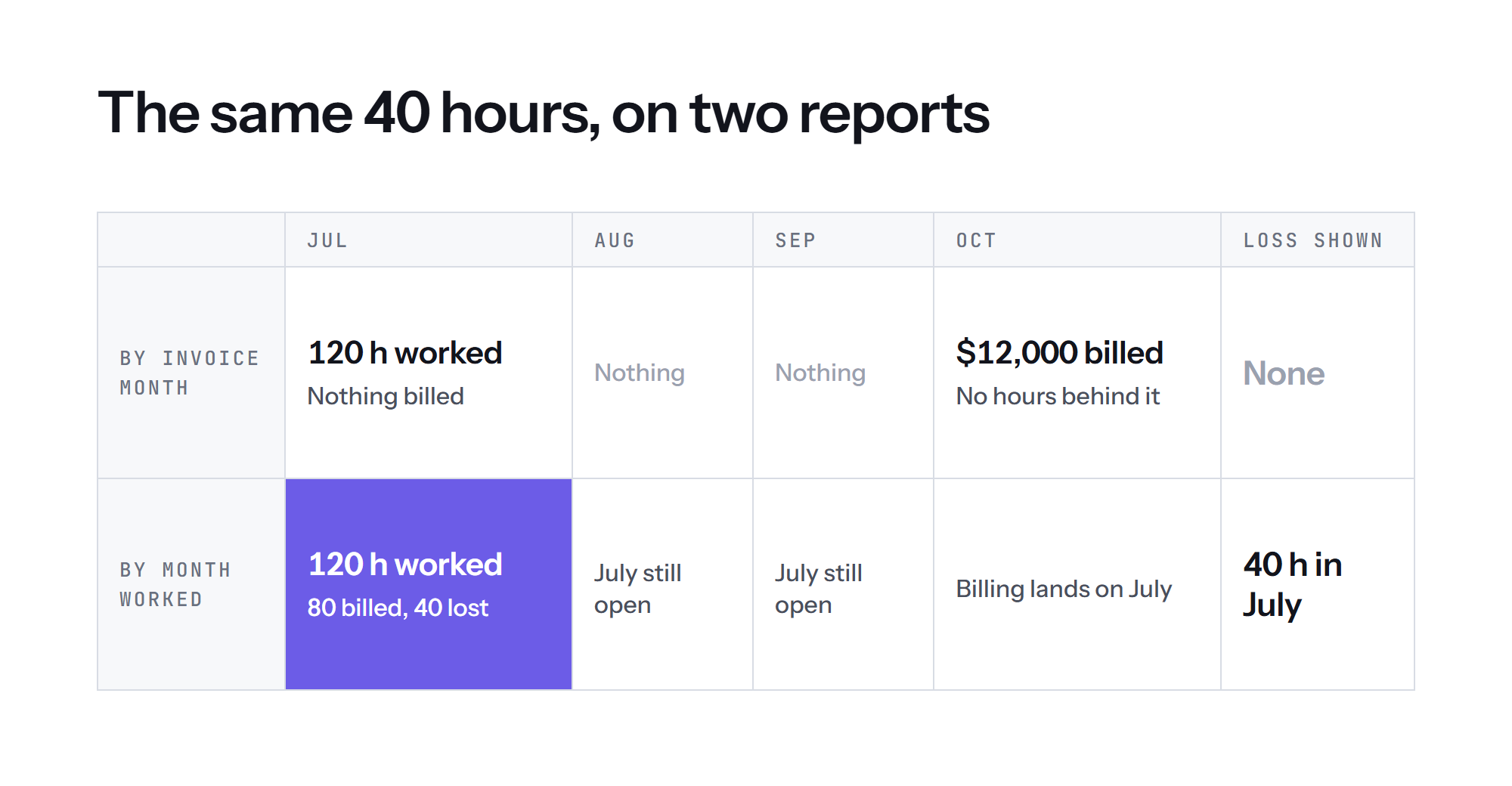
Ask the vendor where a written off hour shows up, and in which month.
How Excede handles it: hours stay in the month they were worked, and revenue stays in the month it was billed, so the numbers still agree with accounting. Time written off counts as lost in the month it was worked, and it stays visible.
5. Earned work that has not been invoiced gets flagged
Earned and not billed is not lost yet. It gets lost when it sits until the client no longer remembers asking for the work. Most systems will show you the gap if you go looking for it. The useful ones tell the person who can act on it.
Ask the vendor what tells a project manager that a project is ready to invoice.
How Excede handles it: every night it checks each fixed fee project for earned work that has not been billed. When the gap is large and the project has gone a while without an invoice, the project manager gets a card saying the project is ready to invoice, with the numbers behind it.
6. Your books stay where they are
Some tools want to become your general ledger. That means moving the books, and the project numbers wait until the migration is done. The opposite risk is a project tool that sits next to the books while nobody reconciles the two, until the principals stop trusting both.
The hard part of connecting systems is rarely the connection. It is that two systems name the same project differently. If the match is wrong, hours land on the wrong job, and every number after that describes the wrong project.
Ask the vendor whether you have to move your books, and how they check that their numbers match your accounting before you rely on them.
How Excede handles it: Excede is not a general ledger. It reads QuickBooks Online and the timesheets and calendars you already use, including Clockify, Toggl Track, Microsoft 365, and Google Workspace. Before launch, we check the platform against the books. When the numbers do not match, we find out why first.
7. Who sets it up, and who stays
Every firm books money its own way. One counts payroll taxes as project labor, and another puts them in overhead. Those choices move the multiplier, and someone has to make them on purpose during setup. When nobody does, the defaults decide, and a few months later the project managers stop opening the tool.
Ask the vendor who configures the system, and whether the same people are still there after launch.
How Excede handles it: every firm gets a dedicated team. Our engineers deploy with your people, build and test each workflow before launch, and stay after it to tune the platform as your project types, staffing, and tools change.
Questions to ask in every demo
Bring a real project that is halfway through, and ask the vendor to answer these on screen:
- Show me each phase's multiplier right now.
- Are consultant fees we bill through our invoices inside the revenue behind that multiplier?
- How do you decide that a phase is 60% complete?
- Where does a written off hour show up, and in which month?
- What tells my project manager that a project is ready to invoice?
- Do we have to move our books to get these numbers?
- Who sets this up, and are they still here after launch?
How the main options compare
| What it is | Where the books live | How it is priced | Setup | |
|---|---|---|---|---|
| Excede | Operating platform for A/E firms, with Growth, Execution, and Finance reading from the same project | Reads QuickBooks Online. Your books do not move. | Scoped per firm. One monthly fee, with no modules to add and no seats to count. | A dedicated team of engineers sets it up with you and stays after launch |
| Monograph | Project management for A/E firms, organized by phase | QuickBooks Online | $45 to $490 a month on its pricing page. Pipeline is sold separately. | Onboarding support and training |
| BQE CORE | Practice management for A/E and professional services firms | QuickBooks Online, or BQE's own Accounting module | Per user, with Accounting, CRM, HR, and Payroll as added modules. Custom quote. | Account manager and support team |
| Deltek Ajera | Project management and accounting in one application for small A/E firms | Inside Ajera | Quote from Deltek | Through Deltek |
| Deltek Vantagepoint | ERP for architecture, engineering, and consulting firms | Inside Vantagepoint, or next to your own financial system with Front Office only | Quote from Deltek | Through Deltek |
Details on other products come from each vendor's public website, checked on November 10, 2026. Pricing and packaging change, so confirm them with the vendor.
If you are already looking at one of them, we wrote a closer comparison for each: Excede and Monograph, Excede and Deltek Ajera, and Excede and BQE CORE.
Where Excede fits
Excede was built by Jonathan Sharp, PE, and Rafael Figueroa, PE, PMP, for their own MEP firm, Collectif Engineering. They got tired of finding out a project was underwater in month four. The firm still runs on the platform, so every screen had a real user before it had a customer.
It fits a firm that wants to keep QuickBooks, see each phase while the work is happening, and have a team set it up around how the firm already works. Your accountant keeps the general ledger and payroll where they already run, and Excede turns those numbers into phase numbers your project managers and principals can act on.
If you want to see your own phases this way, talk to our team.